Trados Studio: soft returns (↵) vs paragraph marks (¶) in Excel segments – a display quirk, not a bug
If you translate Excel files in Trados Studio and have noticed that the source segment shows soft return arrows (↵) at line breaks, but the target shows paragraph marks (¶) for the exact same line breaks – you might reasonably assume something has gone wrong with your translation. I certainly did.
Here’s what it looks like – the source on the left has ↵ symbols, the target on the right has ¶ symbols:
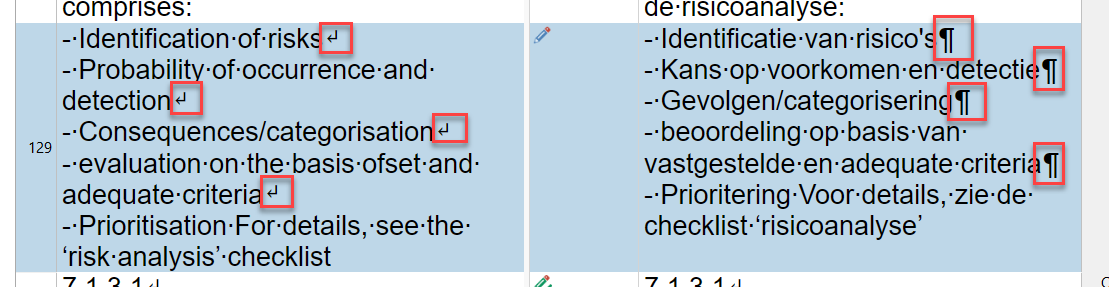
This happens when the target text is written programmatically – whether by a plugin, a batch task, or the Trados API – rather than being typed manually in the editor. I spent an embarrassing amount of time debugging this in Supervertaler for Trados before realising it’s not actually a problem.
What’s going on
Excel files store in-cell line breaks as literal newline characters. When Trados parses the source SDLXLIFF, it loads these newlines from the original file and renders them with the ↵ symbol (soft return). So far, so good.
When a plugin or batch task writes the translation into the target segment – using the Trados SDK’s ProcessSegmentPair or similar API calls – the exact same newline character ends up in the target. But Trados renders it with the ¶ symbol (paragraph mark) instead.
The symbols are different. The underlying data is not.
Proof: the SDLXLIFF and the exported file are identical
If you open the exported SDLXLIFF file in a text editor, both the source and target segments contain identical literal newlines. Here’s a simplified excerpt – notice how the line breaks in the source and target are in exactly the same positions:
Source:
<source>For all relevant sites, the risk analysis comprises:↵
- Identification of risks↵
- Probability of occurrence and detection↵
- Consequences/categorisation↵
- evaluation on the basis of set and adequate criteria↵
- Prioritisation</source>
Target:
<target>Voor alle relevante locaties omvat de risicoanalyse:↵
- Identificatie van risico's↵
- Kans op voorkomen en detectie↵
- Gevolgen/categorisering↵
- beoordeling op basis van vastgestelde en adequate criteria↵
- Prioritering</target>
The ↵ markers show where the literal newline characters are – and they’re in exactly the same positions in both source and target. The SDLXLIFF data is identical; only Trados’s editor renders the symbols differently.
And if you generate the target Excel file (Batch Tasks > Generate Target Translation), the line breaks in the output are correct:
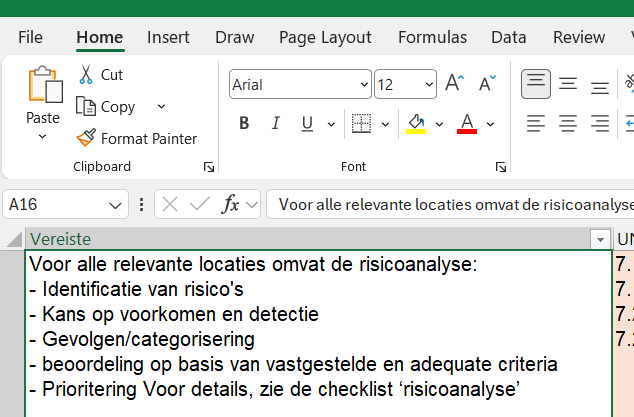
You can also verify this by selecting the source and target text in Trados (right-click > Select All, then Copy) and pasting both into a text editor – they’ll be identical.
Why does Trados render them differently?
Trados’s editor distinguishes between newlines that were loaded by the file type filter (from the original document) and newlines that were written through the API. The former get the ↵ treatment, the latter get ¶. This is purely a rendering decision in the editor’s display layer – it doesn’t reflect any difference in the actual segment data or in what gets written to the target file.
This applies to Excel, Visio, and other file formats that store line breaks as literal text characters rather than as separate XML placeholder tags (the way Word documents use <w:br/> elements).
TL;DR
If you see ¶ in your translated Excel targets where the source has ↵, and the translation was written by a plugin or batch task:
- Don’t panic – the data is correct
- Generate the target file – the Excel output will have proper in-cell line breaks
- Verify in SDLXLIFF if you want to be sure – the source and target will have identical newline characters
It’s a cosmetic display difference in Trados Studio’s editor, not a data integrity issue.
Comments